
TL;DR
Choose a reference-based portrait workflow, supply clear photos showing the scar, and review its position, shape, and texture before publishing. Prompts can describe the desired result, but they don't guarantee preservation; provider testing and explicit editing preferences matter more.
A professional portrait doesn't need to erase a facial scar to look polished. An AI photo generator for portraits with facial scars should support the subject's chosen appearance, whether the image is intended for LinkedIn, a business website, or a dating profile.
Scar-preserving AI portrait generation: Creating or editing a portrait while retaining the subject's requested scar characteristics, alongside recognizable facial features.
For professionals exploring branded imagery, Looktara offers a relevant starting point for considering AI portraits. A useful project brief defines the audience, wardrobe, background, and facial details that should remain recognizable.
The challenge is separating attractive styling from faithful representation. Smooth skin alone isn't evidence of a successful portrait, and an instruction to retain scars isn't proof that every generated image will do so.
Table of Contents
What should a scar-preserving AI portrait retain?
A scar-preserving AI portrait should retain the scar characteristics the subject wants visible, including location, shape, color, and relationship to nearby facial features. The goal is recognizable representation, not automatic enhancement or concealment. Lighting and pose may change how a scar appears, so review should allow natural variation without accepting structural changes.
Define preservation before requesting polish
A useful brief distinguishes identity details from styling choices. A scar crossing the left eyebrow may affect both the skin and the eyebrow outline; retaining only a faint line may not meet the subject's preference.
- Location: The same side of the face and position relative to the eye, lip, or nose.
- Shape: The recognizable length, direction, width, and branching pattern.
- Surface: Relevant raised, recessed, or uneven texture.
- Visibility: The level the subject requests under the selected lighting.
Preference belongs to the person pictured. Keeping, softening, or concealing a scar can each be appropriate when chosen explicitly. A professional brief should never treat concealment as the default.
Separate portrait generation from evidence of accuracy
The supplied research doesn't include a facial-scar preservation benchmark or a verified ranking of suitable tools. Claims that one generator reliably preserves every scar would therefore go beyond the available evidence.
Masood and colleagues' 2022 review of deepfake generation and detection addresses synthetic-media methods, challenges, and countermeasures. That topic provides context for evaluating generated faces, but it doesn't establish scar accuracy for any portrait service.
A credible selection process checks actual outputs against the subject's reference photos, rather than treating realism as proof of identity fidelity.
How should source photos show facial scars?
- Select recent photographs that match the subject's current appearance.
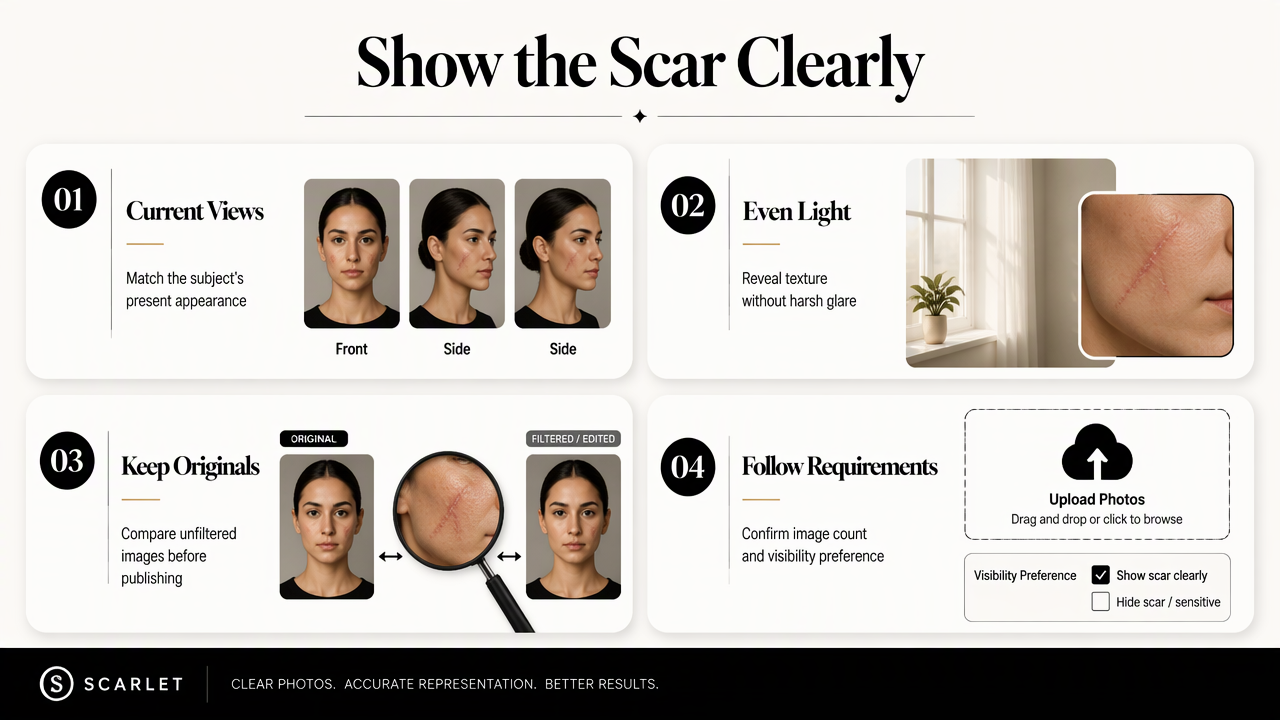
- Include a clear frontal view and relevant side angles.
- Use lighting that reveals the scar without harsh glare.
- Keep unfiltered originals available for comparison.
- Follow the provider's upload requirements and document the subject's preferred level of scar visibility.
Build a balanced reference set
References should show both the whole face and enough detail to judge the scar. A close-up alone leaves out proportions; distant portraits may conceal the texture that matters. Follow the service's requested image count rather than assuming more uploads always improve results.
For example, a subject with a cheek scar could select a frontal photograph, a three-quarter view, and a naturally lit image showing the cheek clearly. These are illustrative choices, not a tested formula.
Keep orientation clear. Mirrored selfies can make left-right comparisons confusing, especially when the scar is a defining reference point. Label reference images if the provider supports notes.
Write a precise appearance brief
A neutral brief can specify: Retain the visible scar on the subject's left cheek, including its position, curved shape, and subtle raised texture. Use professional clothing and a plain background. Maintain recognizable facial proportions.
Avoid vague instructions such as perfect skin when preservation matters. If the tool supports negative prompts, unwanted smoothing can be described there, but prompt wording remains a request rather than a guarantee.
The training-versus-inference distinction also matters. Training: Adjusting a model using data. Inference: Producing an output from an existing model. Providers should explain whether uploaded photographs personalize a model, act as generation references, or support an editing workflow.
How can generated portraits be checked respectfully?
- Compare the output with an unfiltered reference at a similar angle.
- Check scar position, outline, texture, and nearby facial features.
- Separate lighting differences from structural alterations.
- Ask the subject whether the representation matches their preference.
- Approve only images that meet both identity and intended-use requirements.
Review features rather than attractiveness
A review should ask whether the portrait represents the person, not whether the scar appears better or worse. Respectful language describes observable changes: the scar is shorter, the eyebrow gap is missing, or the texture is less visible.
Compare equivalent views where possible. A side-lit reference and a front-lit output won't show surface texture identically. When uncertainty remains, another reference angle can help distinguish a lighting effect from an altered feature.
Check the rest of the face too. Accurate scar placement doesn't compensate for changed eye spacing, lip shape, or jaw proportions.
Use an approval checklist tied to the destination
Different uses require different presentation choices, but the subject's appearance preferences remain the baseline.
- LinkedIn: Check recognition at small profile-image size.
- Business websites: Review consistency across portrait crops and backgrounds.
- Creator profiles: Confirm that stronger styling still reflects the intended public identity.
- Dating profiles: Prefer images that set an honest expectation of appearance.
A practical approval note records the selected output, accepted styling changes, and the subject's consent. Avoid storing unnecessary details about how the scar occurred; its medical history isn't needed to judge portrait accuracy.
Choosing a provider for faithful portrait work
A suitable provider should explain its workflow, offer understandable image-handling terms, and demonstrate results relevant to the subject's appearance requirements. Price and output volume matter, but neither proves that a service can retain a particular scar.

Compare workflows before comparing packages
Workflow labels help narrow the options, although services may combine several approaches.
| Workflow | Main input | Practical role | Question to verify |
|---|---|---|---|
| Text-to-image | Written description | Invented or illustrative portraits | Can it represent the actual person? |
| Reference-based generation | Existing photographs | Identity-guided portrait creation | How are small facial details retained? |
| Personalized model | Subject photographs used for model adaptation | Repeated portrait generation | What happens to uploads and model data? |
| Localized editing | An existing portrait and selected edit areas | Background or wardrobe changes | Can facial areas remain untouched? |
These are workflow categories, not performance rankings. For a strong existing portrait, localized editing may be worth testing before generating an entirely new face.
Ask for evidence and clear data terms
Providers should answer these questions before a paid project:
- Can a sample demonstrate retention of the relevant visible facial difference?
- Can automatic skin retouching be limited or disabled?
- What controls exist for revising an inaccurate output?
- How long are uploads, outputs, and personalized models retained?
- Are photographs used for purposes beyond the requested service?
WanTeam and colleagues' 2025 paper on large-scale video generative models concerns video generation, not scar-preserving portrait evaluation. In 2026, newer generative-model research should not substitute for provider-specific demonstrations.
How Looktara handles this
Looktara can be considered for a portrait project built around a clear representation brief. The supplied information establishes the brand and website, but doesn't document scar-specific controls or preservation performance.
A useful starting brief combines the intended professional setting with the subject's chosen appearance. Wardrobe, framing, background, and visible facial details can then serve as concrete acceptance criteria. Current service information is available at looktara.com.
FAQ: Facial scars in AI portraits
Scar-preserving portrait decisions depend on the subject's preferences, the provider's workflow, and direct review of the finished image.
Can prompts alone guarantee that facial scars remain visible?
Prompts alone cannot guarantee scar preservation. A written instruction communicates intent, but the result still needs comparison with source photographs. Clear references, suitable workflow controls, and subject approval provide a stronger review process. If the scar repeatedly changes, another workflow or a carefully edited original photograph may be more appropriate.
Should scars be removed from professional headshots?
Scar removal should be a personal choice, not an automatic requirement for professional headshots. A portrait can look polished through suitable lighting, clothing, framing, and background selection while retaining visible facial differences. Approval should reflect the subject's wishes and recognizable appearance, rather than an assumed standard of flawless skin.
Can an existing portrait be a better starting point?
An existing portrait can be a useful starting point when it already represents the face and scar accurately. Editing the background or clothing may keep the project more focused than regenerating the entire image. The provider should explain which areas can remain unchanged, and the final result still needs inspection.
Conclusion
Choose an AI photo generator for portraits with facial scars by testing representation, not just visual polish. Prepare clear references, define the desired scar visibility, and approve a sample before committing to a larger batch.
For a professional portrait project, explore Looktara with a prepared appearance brief and a specific destination, such as LinkedIn or a business profile.
Generated by EarlySEO.com