
TL;DR
Deleting photos and deleting a personalized model target different data: image files versus reusable personalization. A complete deletion request should address uploads, generated outputs, model artifacts, account records, and backups separately. The provider's current policy and written confirmation determine the actual scope.
Deleting a portrait isn't the same as deleting the AI personalization behind it. The distinction in AI photo generator delete model vs delete photos matters whenever uploaded selfies become reusable professional imagery. A clear cleanup plan separates the original files from generated pictures and any stored personalization. For professionals considering Looktara, planning the final image's use and eventual removal belongs in the same workflow.
Table of Contents
Delete model vs delete photos: the key distinction
Deleting photos targets image files, while deleting a personalized model targets stored artifacts used to reproduce a person's appearance, where the service creates such artifacts.
Source images: Uploaded photographs used as references or personalization inputs.
Generated outputs: New pictures created by the service.
Personalized model: Person-specific learned parameters or another reusable personalization artifact, rather than necessarily a separate, complete AI model.
The interface label isn't a technical specification. A provider may call a profile, adapter, or collection of reference data a model. The relevant question is which underlying objects the deletion action actually removes.
Five data layers that need separate answers
A complete deletion assessment distinguishes five layers rather than treating every stored item as a photo.
| Data layer | What deletion should clarify | What isn't automatically established |
|---|---|---|
| Source images | Removal of uploaded originals and stored derivatives | Removal of personalization already created |
| Generated outputs | Removal of saved results and associated previews | Removal of uploads or model artifacts |
| Personalized model | Removal of reusable person-specific artifacts | Removal of existing generated pictures |
| Account records | Closure or removal of profile information | Removal of every record retained for a stated purpose |
| Backups | Expiry or removal of recoverable copies | Immediate erasure when live data disappears |
These are conceptual distinctions, not promises about every provider. Some services generate from reference images without maintaining a reusable personalized model. Others may store several kinds of personalization data.
A complete request names the data categories, not just the button that was pressed.
What can remain after photos or models are deleted?
After photos or models are deleted, other data categories may remain unless the provider's deletion process explicitly includes them. Source files, generated portraits, personalization artifacts, account records, and backup copies serve different purposes. Their removal must be checked separately, including whether the action only hides an item or removes its underlying stored data.
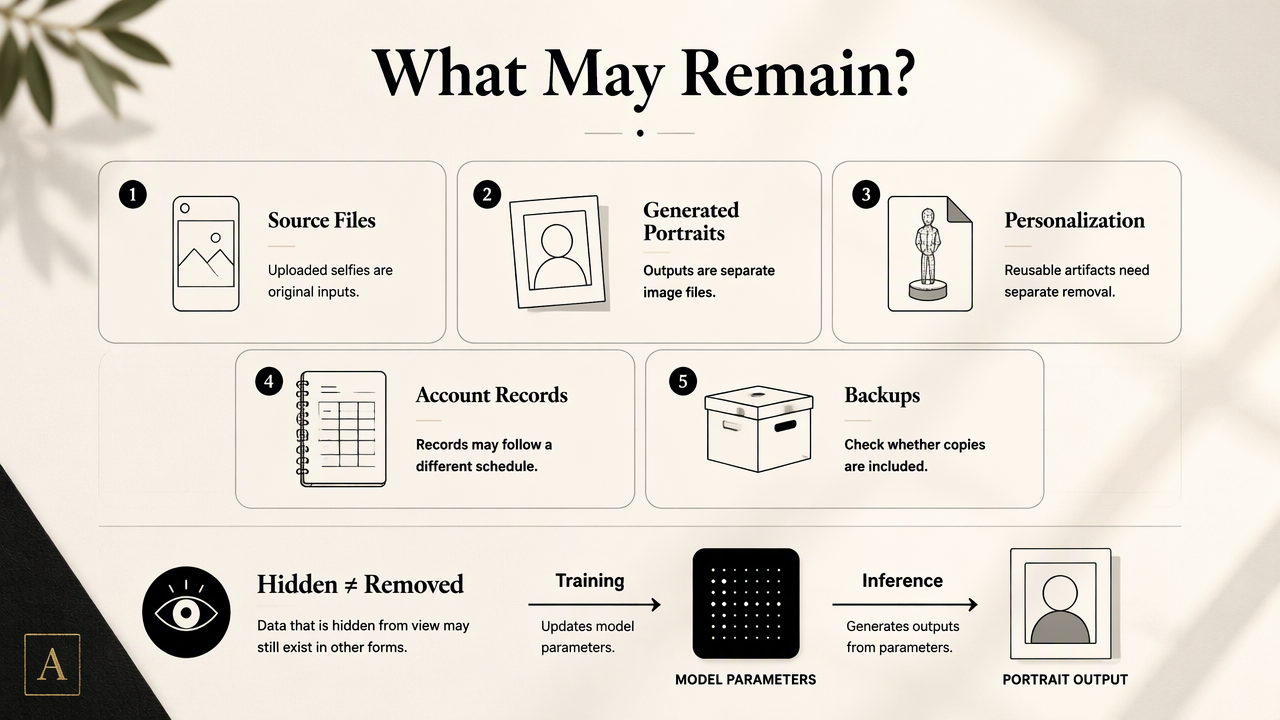
Uploaded files and learned personalization are separate
Removing uploaded selfies doesn't by itself establish that reusable personalization has been removed. Training creates or changes model parameters; inference uses a model to produce an output. Reference-image generation can follow a different path without creating a persistent person-specific model.
A useful example is a service that first builds personalization, then generates ten portraits. Deleting the original selfies addresses the inputs. Deleting the personalization addresses future reuse of that stored artifact. Neither action necessarily addresses the ten saved portraits.
The number here is an illustrative workflow, not a provider benchmark.
Existing portraits and external copies follow their own lifecycle
Deleting personalization doesn't automatically remove pictures already exported or published elsewhere. A LinkedIn headshot, newsletter image, or dating profile picture becomes a separate copy once uploaded to another platform.
Removing a person or object inside an image is also a different task. Ravi and colleagues' 2024 paper, SAM 2: Segment Anything in Images and Videos, concerns image and video segmentation, not an account-level deletion policy. Editing image content shouldn't be confused with erasing stored files.
- Provider storage: Check saved outputs, thumbnails, and sharing links.
- Personal storage: Check downloads, synced folders, and device backups.
- Published copies: Remove or replace images through each destination platform.
Account records and backups require explicit retention terms
Account closure and backup expiry are separate questions from gallery deletion. A provider's policy should explain which records remain, the purpose of retention, and the applicable period or deletion trigger.
For backups, ask whether deleted data stays excluded from normal use and how deletion is preserved after a restoration. A fixed deadline shouldn't be assumed unless the published policy or written confirmation supplies one.
How should a deletion request be verified?
- Verify a deletion request by listing every relevant data category.
- Read the provider's current privacy and retention policies.
- Match each dashboard control to its stated scope.
- Request removal of categories the controls don't cover.
- Obtain written confirmation of completion and remaining retention.
- Track backup expiry and separately remove external copies.
Provider questions that turn policy wording into clear answers
A useful provider checklist asks for the scope, timing, and exceptions behind each deletion promise. Published policies are the starting point; support confirmation can clarify how those policies apply to a particular account.
- Uploads: Does deletion include originals, resized copies, crops, and other stored derivatives?
- Outputs: Does it include previews, downloadable results, and hosted sharing links?
- Personalization: Which artifacts exist, and does deleting the model remove all person-specific artifacts?
- Other training use: Were uploads used beyond the requested personalization, and what removal process applies?
- Account records: Which records remain after closure, for what purpose, and for how long?
- Backups and processors: What retention applies to backup copies and third-party processing systems?
Record the policy's effective date. For decisions made in 2026, an older help article shouldn't substitute for the currently applicable policy.
Evidence that supports a completed request
Written confirmation should identify the request date, affected categories, completed actions, and any remaining retention period. A screenshot of an empty gallery documents the interface state, but it doesn't establish what happened to model artifacts or backups.
A practical request can ask the provider to confirm deletion of source images, generated outputs, person-specific personalization, and eligible account data, then describe any retained copies and their expiry. No universal completion deadline follows from the phrase delete model.
Distinguish removed from view, removed from active storage, and expired from backups when recording completion.
How Looktara handles this: confirm the deletion scope
Looktara's deletion scope should be established through its current published terms and account-specific confirmation, using the same five-category framework. Professional-image planning benefits from a clear record of inputs, selected outputs, and publication destinations.
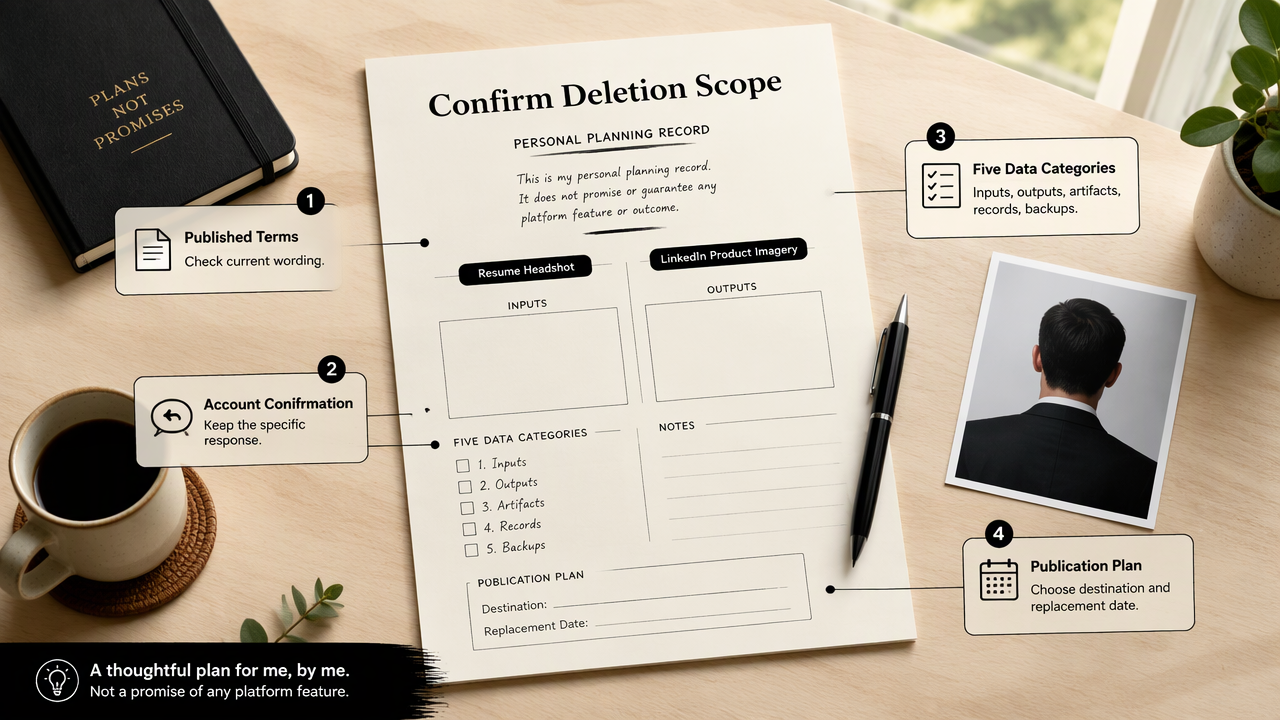
The Looktara platform is a relevant starting point for professional imagery projects such as resume headshot planning. A job seeker can organize the chosen headshot, its destination, and the date it should be replaced before completing the project.
For business owners exploring LinkedIn product imagery, the same inventory can distinguish reference assets from finished marketing pictures. That keeps account cleanup separate from managing published brand materials.
Which deletion action fits which goal?
The appropriate action follows the goal rather than the name of the dashboard control.
- Keep selected portraits: Save permitted final copies before removing hosted outputs.
- End reusable personalization: Request deletion of the relevant person-specific artifacts.
- Finish the entire project: Address uploads, outputs, personalization, and account data together.
- Replace public imagery: Update the destination platforms separately.
A written project checklist makes these choices easier to explain to support and easier to verify later.
FAQ: AI portrait deletion and retention
Deletion questions are easiest to resolve when file removal, personalization removal, and account closure are treated as distinct actions.
Does deleting uploaded photos stop future portraits?
Deleting uploaded photos doesn't necessarily stop future generation if reusable personalization remains. The outcome depends on the service's architecture and what its deletion control removes. A provider should clarify whether generation relies on stored reference images, learned person-specific parameters, or another artifact, and whether deleting uploads also removes that personalization.
Does deleting a personalized model erase the base AI model?
Deleting a personalized model generally refers to person-specific artifacts, not the provider's shared base model. However, model can be a loose interface label. Confirmation should identify the actual artifact removed and clarify whether uploaded images had any separate training use beyond the personalization requested for that account.
Is deleting an account enough to remove everything?
Account deletion is sufficient only if its documented scope covers the relevant data categories. The policy should explain treatment of uploads, generated images, personalization, account records, and backups. It should also identify any retention exceptions. Previously downloaded or externally published pictures require separate action outside the generator's account controls.
Conclusion
For AI photo generator delete model vs delete photos, the practical next step is a five-part inventory followed by a written deletion request. Keep selected final images, document publication destinations, and confirm the scope and timing for each stored category. For the next professional-image project, visit looktara.com and pair image planning with a clear retention checklist.
Generated by EarlySEO.com